
If you've reached this part of the blog, you're probably wondering why I haven't mentioned powerups yet despite the fact that I had added one into the game a few blogs ago. This was because I wanted to first perfect how they work as well as adding in a brand new bonus powerup!
So What Are the Powerups?
For our game SAEED BASHEER and I decided to stick with two very classic but very fitting powerups - Speed Boosts and Money Multipliers! Since our game is a car game speed boosts would increase the fast paced nature of the game, giving some players a competitive edge. Additionally, since our game is also a game about making money by completing deliveries, we decided that a powerup to increase money was essential.
Both powerups are of course temporary and will deactivate after 10 seconds for the speed boost and 25 seconds for the money multiplier. Planning the powerups required careful consideration in order to ensure that some players would not become overpowered which would ruin the balance of the game. Therefore, SAEED BASHEER and I drew up some plans on machinations.io to see how the powerups would preform and affect Post War's gameplay. Here is what we came up with:
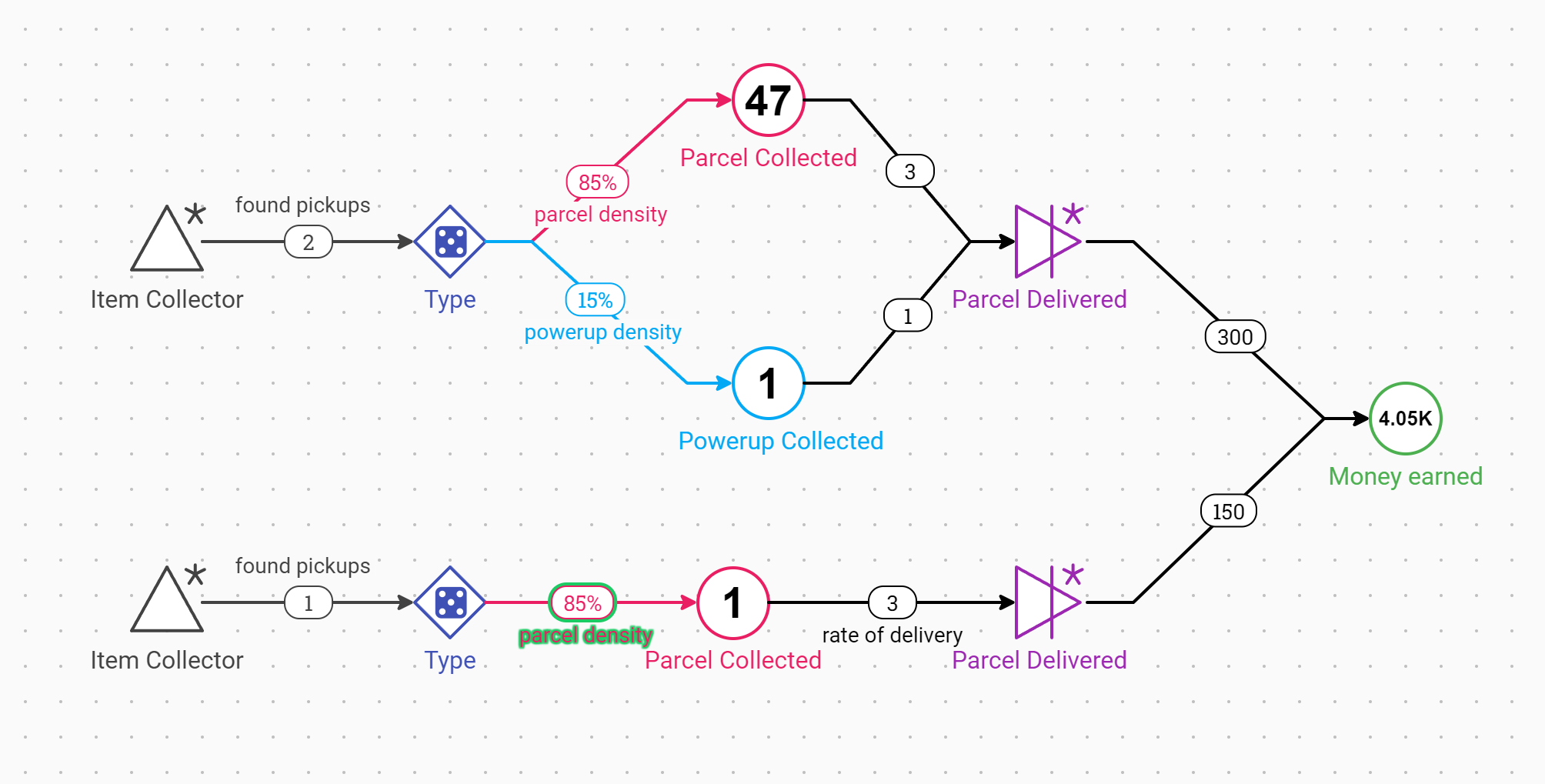
This chart enabled us to see decide a suitable powerup density around the map. The powerup being tested within the image is the Money Multiplier. We tested the different rates of money collection based on the vehicle type when using the powerups. Then based on this we priced our vehicles accordingly. Here is a smaller more detailed image comparing the money earned when picking up the Money Multiplier with different vehicles
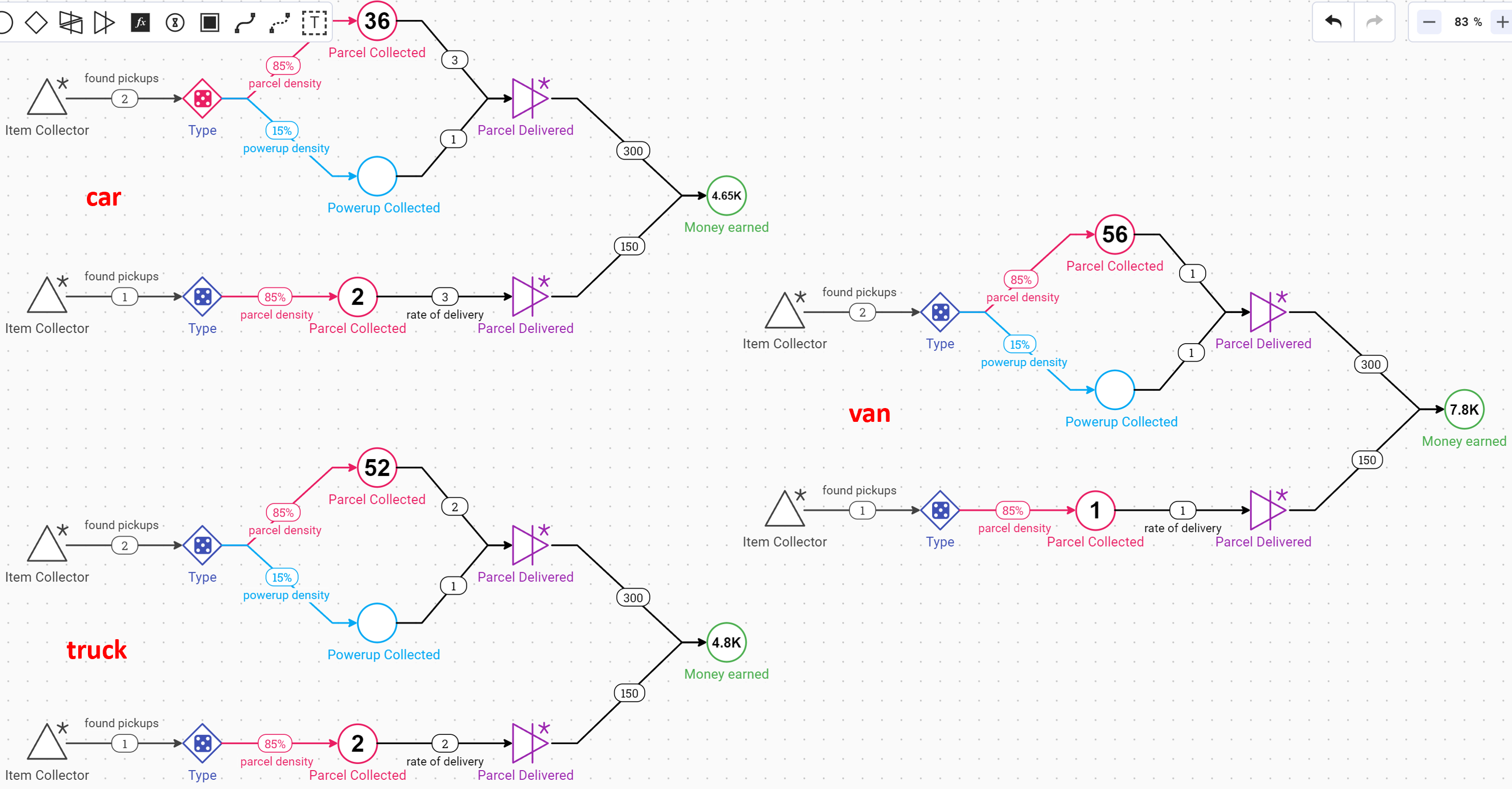
Here you can see that more money is earned with the larger vehicles as they have greater storage capacity despite the fact that they are slower.
The Speed Powerup
When creating the speed powerup I knew that this was something that would have to be temporary. This meant that the powerup would require a script that would reactivate after a determined amount of seconds. As a result of this, I had to ensure that the gameObject was not destroyed on collision with the player. Instead, the script holding the mesh and the collider should be temporarily deactivated. Here is the code of how I did this:
using System;
using System.Collections;
using UnityEngine;

[RequireComponent(typeof(Collider))]
public class SpeedPowerup : MonoBehaviour
{
    [SerializeField]
    private float _speedIncreaseAmount = 200;
    [SerializeField]
    private float _powerupDuration = 10;
    [SerializeField]
    private float _respawnTime = 20; // Time in seconds before respawn

    [SerializeField]
    private GameObject _artToDisable = null;

    private Collider _collider;

    private void Awake()
    {
        _collider = GetComponent<Collider>();
    }

    private void OnTriggerEnter(Collider other)
    {
        //Get access to the wheel controller script within the colliding object
        WheelControllers playerVehicle = other.gameObject.GetComponent<WheelControllers>();

        if (playerVehicle != null)
        {
            //powerup sequence
            StartCoroutine(PowerupSequence(playerVehicle));
        }
    }

    public IEnumerator PowerupSequence(WheelControllers playerVehicle)
    {
        //soft disable
        _collider.enabled = false;
        _artToDisable.SetActive(false);

        ActivatePowerup(playerVehicle);
        yield return new WaitForSeconds(_powerupDuration);
        DeactivatePowerup(playerVehicle);

        // Wait for respawn
        yield return new WaitForSeconds(_respawnTime);

        // Reactivate and respawn
        _collider.enabled = true;
        _artToDisable.SetActive(true);
    }

    private void ActivatePowerup(WheelControllers playerVehicle)
    {
        playerVehicle.SetMoveSpeed(_speedIncreaseAmount);
        playerVehicle.SetBoosters(true);
    }

    private void DeactivatePowerup(WheelControllers playerVehicle)
    {
        playerVehicle.SetMoveSpeed(-_speedIncreaseAmount);
        playerVehicle.SetBoosters(false);
    }
}
I was able to learn about the inheritance of different objects and what components to attach to each object that made up the powerup with the help of 'ACDev' on YouTube. I also added in some extra code so that the powerup respawns after a certain amount of time.
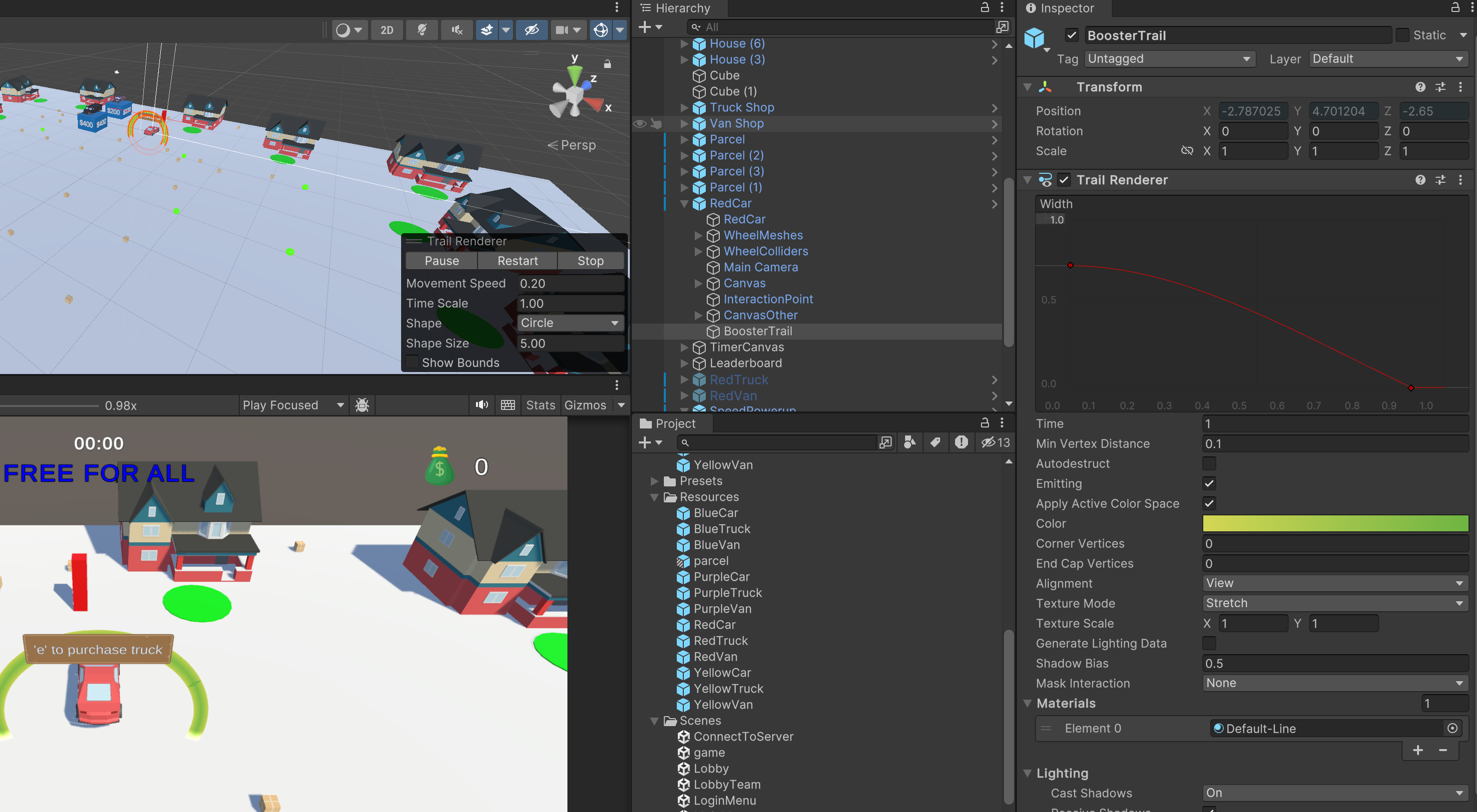
In the image below you can see how I created the booster trail effect also with the help of with the help of 'ACDev' on YouTube.- a trail renderer has been applied to the player game object and this is set to active when the powerup is collected.
Here is a video showing the power up mechanics in more detail:
The Money Multiplier Powerup
In order to create the money multiplier powerup, I replicated many parts of the speed powerup script. However in this case, instead of accessing the player controller which was where the acceleration variable was stored, I instead am accessing the player inventory. This is because this is where the player's money is stored as well as the variable that determines how much money is earned per delivery. Here is the script for that below:
using System.Collections;
using System.Collections.Generic;
using UnityEngine;
using TMPro;

[RequireComponent(typeof(Collider))]
public class MoneyPowerup : MonoBehaviour
{
    [SerializeField]
    private int _moneyIncreaseAmount = 150;
    [SerializeField]
    private float _powerupDuration = 20;
    [SerializeField]
    private float _respawnTime = 20; // Time in seconds before respawn

    [SerializeField]
    private GameObject _artToDisable = null;

    private Collider _collider;

    [SerializeField] TextMeshProUGUI powerupCollectedText;

    private void Awake()
    {
        _collider = GetComponent<Collider>();
    }

    private void OnTriggerEnter(Collider other)
    {
        //Get access to the wheel controller script within the colliding object
        PlayerInventory playerVehicle = other.gameObject.GetComponent<PlayerInventory>();

        if (playerVehicle != null)
        {
            //powerup sequence
            StartCoroutine(PowerupSequence(playerVehicle));
        }
    }

    public IEnumerator PowerupSequence(PlayerInventory playerVehicle)
    {
        //soft disable
        _collider.enabled = false;
        _artToDisable.SetActive(false);

        ActivatePowerup(playerVehicle);
        yield return new WaitForSeconds(_powerupDuration);
        DeactivatePowerup(playerVehicle);

        // Wait for respawn
        yield return new WaitForSeconds(_respawnTime);

        // Reactivate and respawn
        _collider.enabled = true;
        _artToDisable.SetActive(true);
    }

    private void ActivatePowerup(PlayerInventory playerVehicle)
    {
        playerVehicle.SetMoneyMultiplier(+_moneyIncreaseAmount);
        StartCoroutine(ShowMessageAndHide("Money Multiplier Activated!", 2f));
        playerVehicle.SetSpinner(true);
    }

    private void DeactivatePowerup(PlayerInventory playerVehicle)
    {
        playerVehicle.SetMoneyMultiplier(-_moneyIncreaseAmount);
        StartCoroutine(ShowMessageAndHide("Money Multiplier Deactivated!", 2f));
        playerVehicle.SetSpinner(false);
    }

    IEnumerator ShowMessageAndHide(string message, float duration)
    {
        powerupCollectedText.text = message;
        powerupCollectedText.gameObject.SetActive(true);
        yield return new WaitForSeconds(duration);
        powerupCollectedText.gameObject.SetActive(false);
    }
}
You can see that there are slight differences between the speed boost and the money multiplier - the main difference is what component I am accessing on the player character. I also added some text to the screen to let the player know when the money multiplier was activated and deactivated.
Additionally, I added a rotating sphere to the player character that becomes visible when the powerup is activated. You can see that in the video below:
Here you can see that the player is awarded $300 for making the delivery rather than the regular $150 they are often awarded. You can also see the on screen text letter the player know the powerup has been activated, as well as the visual rotating cylinder.
Conclusion
You may have also noticed a few slight changes in the above clip compared to all the rest...more on that in tomorrow's final blog! Stay tuned.


